11 min to read
Core Components: Orchestration, Templates, Automation, and Gates
The Four Pillars That Make Software Factories Work
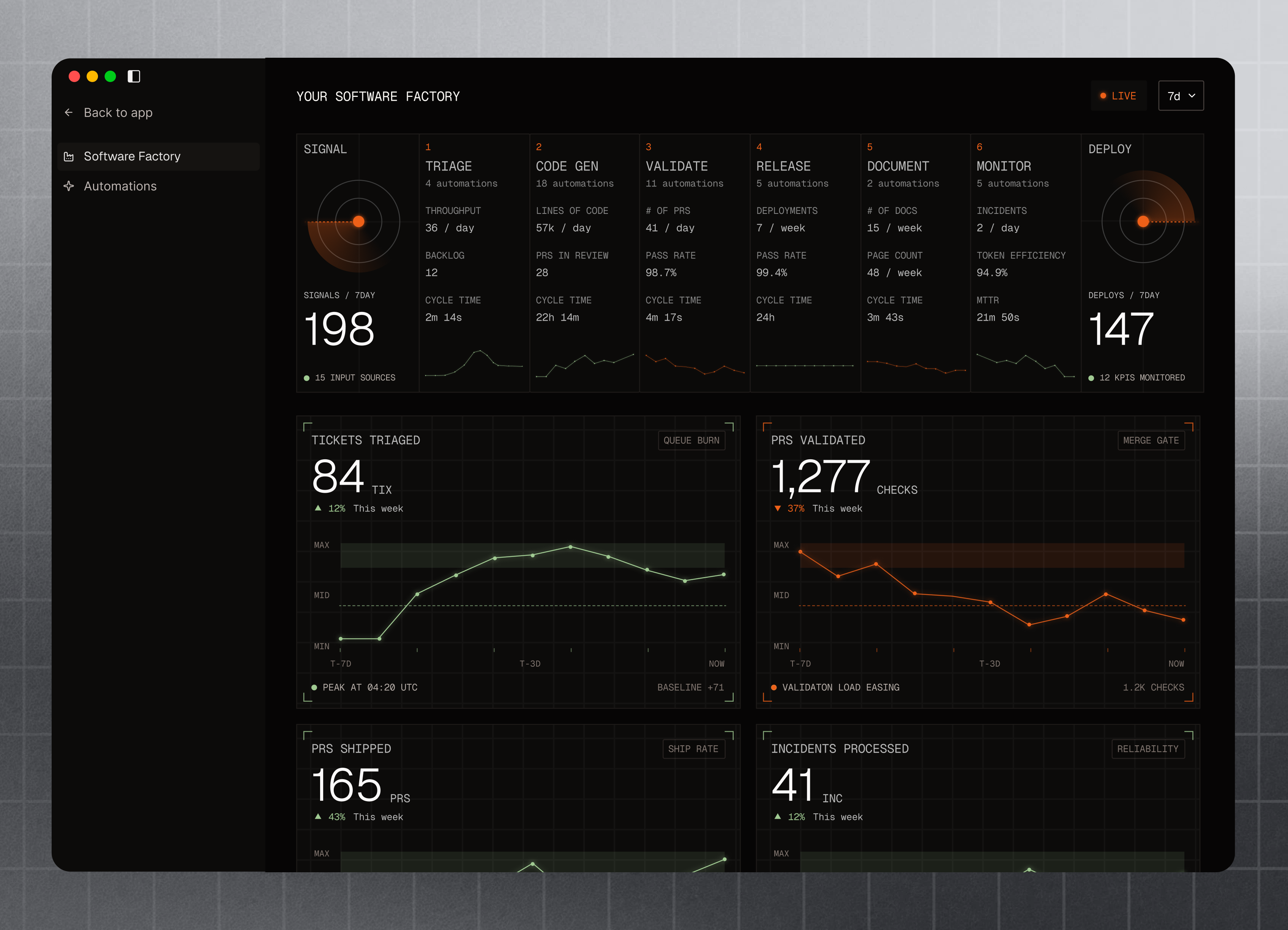
Image credit: Factory.ai
The Four Core Components
TL;DR — Software factories run on four components in sequence: orchestration (deciding what to build), templating (pre-built solutions), automation (executing steps), and gates (enforcing quality). Together they transform developer intent into production-ready code without manual boilerplate, code review delays, or quality surprises. Real-world proof: Google deploys 20,000+ builds daily using these patterns; Netflix runs 4,000+ deployments daily; Stripe generates SDKs for 14 languages automatically.
A software factory isn’t a single tool—it’s an integrated system where four components work together in sequence. Remove any one and the factory breaks down.
1. Orchestration: The Decision Engine
Orchestration is your factory’s conductor. It:
- Asks developers the right questions in the right order
- Routes requests to the correct template or workflow
- Decides when to pause for human input vs. proceed automatically
- Captures developer intent precisely
Example: Authentication Feature Request
Without orchestration:
Developer: "Add authentication"
Team lead: (confused) "Which kind? JWT? OAuth2? Session-based?
Should we use Passport? NextAuth? Auth0?"
Developer: (tries to implement, gets it wrong)
Code review: 3 rounds of back-and-forth
With orchestration:
Orchestrator: "What type of auth? (1) Session-based (2) JWT (3) OAuth2?"
Developer: "3"
Orchestrator: "Which OAuth provider? (1) Google (2) GitHub (3) Microsoft?"
Developer: "2"
Orchestrator: "Role-based access control? (Y/N)"
Developer: "Y"
→ Routes to OAuth2+GitHub+RBAC template
→ Generates scaffolding
→ Automation proceeds
Orchestration in Real Factories
Netflix — Decision tree for every new microservice:
- What data does it store? (database type)
- How many concurrent users? (scaling class)
- Internal or external? (API design)
- Each answer routes to a pre-built template
Uber — Orchestration for new driver features:
- Geography-specific? (affects routing logic)
- Real-time or batch? (affects infrastructure)
- A/B testable? (affects data pipeline)
- Routes to microservice scaffolds with all dependencies pre-configured
Building Orchestration
# Example: Orchestration flow for REST API feature
Orchestration:
  questions:
    - id: endpoint_type
      text: "What type of endpoint?"
      options: [GET, POST, PUT, DELETE, PATCH]

    - id: auth_required
      text: "Requires authentication?"
      options: [yes, no]
      if: endpoint_type != GET

    - id: rate_limit
      text: "Rate limit needed?"
      options: [yes, no]
      if: auth_required

  routing:
    public_read:
      template: public-get-endpoint
    authenticated_write:
      template: authenticated-post-endpoint
      with: [auth, validation, logging]
    rate_limited:
      template: rate-limited-endpoint
      with: [redis-cache, throttle-middleware]
2. Templating: Pre-Built Solutions
Templates are the reusable building blocks. They contain:
- Directory structure
- Starter code and boilerplate
- Configuration files
- Test scaffolds
- Documentation outlines
- Dependency specifications
Anatomy of a Template
A REST API template might include:
rest-api-template/
├── src/
│   ├── routes/          # Empty, ready for endpoints
│   ├── middleware/      # Auth, validation, error handling
│   ├── models/          # Database schema template
│   ├── services/        # Business logic structure
│   ├── controllers/     # Request handlers
│   └── utils/           # Helpers (logging, auth, caching)
├── tests/
│   ├── unit/            # Test structure for services
│   ├── integration/     # API endpoint tests
│   └── fixtures/        # Mock data, test utilities
├── .env.example         # Environment variables
├── docker-compose.yml   # Local dev environment
├── Dockerfile           # Production image
├── package.json         # Dependencies pre-specified
├── .eslintrc            # Code standards
├── jest.config.js       # Testing configuration
└── README.md            # Setup instructions
Why Templates Win
Without templates:
- Each new project invents its own structure
- Inconsistent patterns across codebases
- New developers learn project-specific conventions
- Testing, logging, error handling vary wildly
- Migration between projects is painful
With templates:
- Consistent structure across all projects
- Familiar patterns everywhere
- New developers onboard faster
- Easy to enforce standards
- Moving between projects is trivial
Real-World Template Libraries
Google’s Bazel — Build system templates for every language:
- C++ projects
- Python projects
- JavaScript projects
- Java projects
- Mixed-language monorepos
Each template pre-configures: dependency resolution, testing, optimization, bundling, deployment.
Netflix’s API gateway — Microservice templates:
- Standard logging (JSON format)
- Standard metrics (Prometheus)
- Standard error handling (400/500 codes)
- Standard auth (OAuth2)
- Standard rate limiting
- All pre-configured in every service
Stripe’s SDK generation — SDK templates for every language:
- Python SDK template
- JavaScript SDK template
- Go SDK template
- Java SDK template
- Ruby SDK template
All SDKs share: same API methods, same error handling, same retry logic, same documentation structure.
3. Automation: Executing Steps
Automation runs the factory’s workflow automatically:
- Code generation (scaffolding)
- Linting and formatting
- Running tests
- Building artifacts
- Deploying to staging
- Running integration tests
- Security scanning
- Pushing to production
Automation Pipeline Example
Developer pushes code
  ↓
[Trigger] Git commit hook
  ↓
[Stage 1] Lint and format (ESLint, Prettier)
  ↓ (fail: reject commit)
[Stage 2] Run unit tests (Jest)
  ↓ (fail: halt pipeline)
[Stage 3] Security scan (SonarQube, SAST)
  ↓ (medium risk: flag, continue; high: block)
[Stage 4] Build artifact (bundler, Docker image)
  ↓
[Stage 5] Deploy to staging (K8s)
  ↓
[Stage 6] Run E2E tests (Playwright)
  ↓ (fail: rollback, notify)
[Stage 7] Performance tests
  ↓ (degradation: flag, continue)
[Stage 8] Deploy to production
  ↓
[Stage 9] Monitor errors, performance
  ↓ (incident detected: auto-rollback)
Automation Examples
GitHub Actions — Automation in minutes:
name: Deploy Pipeline
on: [push]

jobs:
  test:
    runs-on: ubuntu-latest
    steps:
      - uses: actions/checkout@v3
      - run: npm test
      - run: npm run lint

  deploy:
    needs: test
    runs-on: ubuntu-latest
    steps:
      - run: docker build -t app .
      - run: docker push gcr.io/project/app
      - run: kubectl rollout restart deployment/app
GitLab CI — Enterprise automation:
- Parallel stages
- Conditional execution
- Artifact caching
- Auto-scaling runners
Vercel — Frontend automation:
- Automatic preview deploys on PR
- Production deploy on merge to main
- Automatic rollback on errors
- Performance metrics built-in
4. Quality Gates: Preventing Failures
Quality gates are automated checkpoints that prevent bad code from reaching production.
Common Quality Gates
| Gate | Checks | Action If Failed |
|---|---|---|
| Lint | Code style, syntax errors | Reject commit |
| Unit tests | Individual function correctness | Block pipeline |
| Type checking | TypeScript, type safety | Reject PR |
| Security scan | Known vulnerabilities, injection flaws | Flag review, block if critical |
| Performance | Build size, load time degradation | Flag review, can override |
| Coverage | Test code coverage ≥80% | Block merge if below threshold |
| Integration tests | Services work together | Block deployment |
| Accessibility | WCAG compliance | Flag review |
| E2E tests | Critical user flows work | Block production deployment |
Gate Configuration Example
Quality Gates:
  lint:
    enabled: true
    fail_build: true

  unit_tests:
    enabled: true
    fail_build: true
    minimum_coverage: 80

  security_scan:
    enabled: true
    fail_build: true  # Fail only on critical
    severity_threshold: critical

  performance:
    enabled: true
    fail_build: false  # Warn only
    max_bundle_size_increase: 10%  # Flag if >10% larger

  e2e_tests:
    enabled: true
    fail_build: true
    critical_paths: [login, checkout, payment]
Gates in Production
Facebook gates every deploy:
- Canary deploy (1% users)
- Monitor errors/performance for 2 hours
- If issues: auto-rollback
- If clean: proceed to 10%, 50%, 100%
Amazon gates every change:
- Change must have executive sign-off (automated policy check)
- Can only deploy during business hours
- Must have runbook for rollback
- Must have on-call engineer monitoring
Google gates for production:
- Must pass all tests
- Must have >90% code coverage for that service
- Must have passed for 24 hours in canary
- Must have a documented rollback plan
How The Four Components Work Together
Developer Intent
  ↓
[Orchestration] "What do you want to build?"
  → Routes to correct template based on answers
  ↓
[Template] Pre-built scaffolding generated
  → Directory structure, boilerplate, config created
  ↓
[Automation] Pipeline executes
  → Lint → Test → Build → Security scan → Deploy
  ↓
[Quality Gates] Checkpoints validate each step
  → Fail fast if any gate rejected
  ↓
Production-Ready Code
The Compound Effect
When orchestration, templates, automation, and gates work together:
- Developers spend 10% time coding, 90% time thinking (not wrestling with boilerplate)
- Onboarding drops from weeks to days (templates and patterns are consistent)
- Bugs decrease 60-80% (gates catch issues before production)
- Deployment frequency increases 5-10x (automation removes bottlenecks)
- Code quality is measurable (gates enforce standards consistently)
Frequently Asked Questions
Q: Do we need all four components to have a software factory?
A: Yes, but you can start with just orchestration + templates. A factory with only automation but no orchestration still requires developers to make decisions manually. A factory with only gates but no automation wastes developer time waiting for manual reviews. All four components reinforce each other — remove any one and the system breaks down.
Q: What’s the difference between a template and a boilerplate repository?
A: Templates are generated for each use (fresh, no accumulated tech debt). Boilerplate repositories are copy-pasted (outdated faster, inconsistent modifications). Templates live in a central location and can be updated once, applied everywhere. Google applies Bazel template updates to 100,000+ builds daily — a single change applies across the entire codebase.
Q: Can we use cloud platforms instead of building this?
A: Partially. Platforms like Vercel handle automation and gates well. But orchestration and templating are still your responsibility — you must design your project structure, your decision trees, and your scaffolding. Most factories use cloud CI/CD for automation, but customize orchestration and templating.
Q: How often should we update our templates?
A: When your tech stack evolves, your templates must follow. At Netflix, templates are updated whenever dependencies have security patches (weekly) or major version releases (monthly). Updates are automated via templates, so all new projects get the latest versions instantly.
Q: What if an orchestration decision or template doesn’t fit our project?
A: Good orchestration is flexible — it should offer “advanced” or “custom” paths. For templates, always allow overrides. A developer should be able to use a template as a starting point, then diverge if needed. The default case should be 80% of use cases; edge cases can bypass the template system.
Q: How do we know if our gates are too strict vs. too lenient?
A: Measure: (1) If >5% of PRs get blocked and developer override rate is high → gates are too strict. (2) If bugs reach production weekly → gates are too lenient. (3) If developers create workarounds to bypass gates → gates are poorly designed (wrong incentives). Goal: <1% PR blocks, <1 production bug per 1000 deploys, zero workarounds.
Q: Can AI agents replace orchestration?
A: Yes, this is the future. Instead of developers answering questions, an orchestration agent (LLM-powered) could infer intent from requirements, PRs, or code comments. See Part 6: Adding AI Agents for how to layer AI on top of orchestration.
Key Takeaways
- ✅ Software factories have four interdependent components, not one tool
- ✅ Orchestration captures developer intent precisely
- ✅ Templates eliminate boilerplate and ensure consistency
- ✅ Automation removes human bottlenecks
- ✅ Quality gates prevent failures before production
- ✅ Together: 10x developer velocity + fewer bugs
Next in the Series
- ← Part 2: Why Build a Software Factory?
- → Part 4: Real-World Examples: Netflix, Google, Stripe, Uber
- Jump Ahead: Part 5: How to Build
- Full Series: Autonomous Software Factories
Next in the series: Real-world factory examples from Netflix, Google, Stripe, and Uber — how they implemented these four components.