17 min to read
Spec-Driven Development: A Practical Guide to Building with AI
Keep intent in specs, work in focused loops, and verify what your agent builds
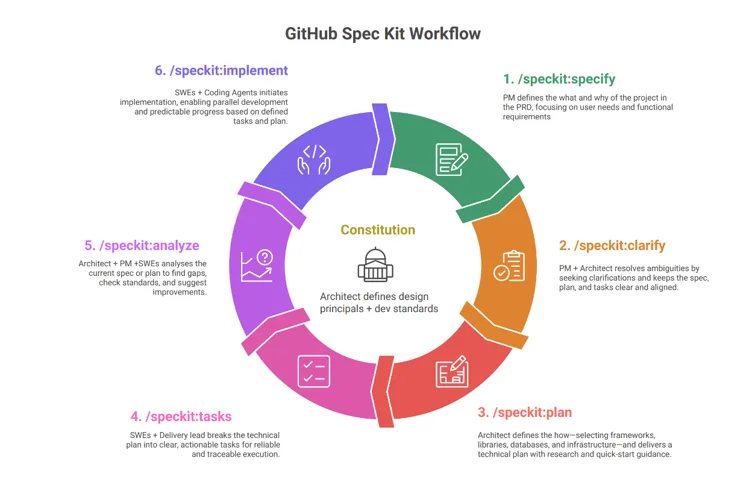
Image credit: Image from Microsoft Dev Blogs
Spec-Driven Development (SDD) is a workflow in which reviewed specifications guide implementation and verification. You record product intent, constraints, and acceptance criteria outside the chat, then ask a coding agent to work against those artifacts. The benefit is continuity: a new session can recover what matters without reconstructing a long conversation.
Imagine asking an assistant to add reading progress to a learning site. The first version looks reasonable. Later prompts introduce accounts, a database, and synchronization, even though you wanted browser-local storage. Nothing in the latest request explicitly rejects those additions. Your architecture has become a negotiation scattered across messages.
A spec gives you somewhere to record: progress stays local, no account is required, and cross-device synchronization is out of scope. Those decisions become reviewable before the agent edits code.
That is the approach behind the DeepLearning.AI course on Spec-Driven Development with Coding Agents, taught by Paul Everitt in partnership with JetBrains. The workflow below develops that constitution-and-feature-loop model into a practical way to run your own projects.
What Changes with Spec-Driven Development?
In a prompt-only workflow, the conversation often carries requirements, architecture decisions, debugging notes, and approval all at once. When something changes, you correct the assistant and hope the correction remains relevant.
SDD separates those responsibilities. The specification describes what users need and why. The technical plan explains how the existing system will satisfy those needs. Validation describes the evidence required before the feature is considered complete.
| Question | Prompt-only workflow | Spec-driven workflow |
|---|---|---|
| Where is intent recorded? | Scattered through chat | Reviewed specification |
| How are assumptions handled? | Often inferred during coding | Identified and resolved before execution |
| What survives a new session? | Whatever gets summarized or pasted | Named artifacts the agent reloads |
| What means done? | Output looks plausible | Acceptance criteria have supporting evidence |
| How does scope change? | Another prompt | A reviewed spec and plan update |
Calling the agent an implementation compiler is a useful mental model: humans own the intent, and agents help translate it into code. But an LLM is not a deterministic compiler. It can misunderstand a clear requirement, invent an API, or generate a test that merely confirms its own mistake. Review and executable checks remain necessary.
Vibe Coding, Context Rot, and Persistent Intent
Vibe coding usually describes building through natural-language prompts while giving limited attention to the generated implementation. It can be useful for disposable experiments. You may want to explore an interaction before deciding whether the idea deserves engineering effort.
Problems arise when that exploratory style becomes the process for software you must maintain. A working demo says little about authorization, migration safety, failure handling, or consistency with the rest of the repository.
Context rot is a related problem: important constraints compete with accumulated chat, tool output, failed attempts, and old decisions. Some assistants also compact or truncate history. A long window is not a guarantee that the model will use every detail correctly.
GSD Core’s context-engineering explanation describes fresh, scoped contexts and durable artifacts as a response to this problem. Treat that as a workflow strategy, not proof that every long session inevitably fails.
The practical distinction is between remembering and retrieving. Instead of asking the assistant to remember everything, tell it which current documents to read for this task. Saving a spec alone does nothing if the agent never loads it.
Keep the active context small enough to inspect: the relevant requirements, nearby implementation, current plan, and unresolved questions. Retrieve API documentation when needed rather than pasting an entire knowledge base. The same principle appears in curated documentation for AI agents.
Build a Project Constitution Before Feature Specs
A Project Constitution records agreements that should survive individual features: who the product serves, which boundaries matter, and which engineering rules apply. It should be short enough that people actually review it.
The course materials organize this foundation into three files. Their names are a useful convention, not a universal SDD requirement.
Mission: Users, Outcomes, and Non-Goals
mission.md explains the product’s purpose. For a learning site, that could be helping developers follow technical lessons and resume unfinished reading.
Non-goals prevent attractive detours. If the first version is a static publication, say whether accounts, payments, personalized recommendations, and cross-device history are excluded. A feature request should not silently overturn those boundaries.
Tech Stack: Constraints with Reasons
tech-stack.md records the supported language, framework, storage, deployment environment, and architectural conventions. Reasons matter: “browser storage because no backend is available” is more useful than an unexplained preference.
Add test and security expectations where they belong. Require accessible controls, prohibit logging secrets, and state how changes are validated. Prefer requirements that someone can check over phrases such as “production-grade code.”
Roadmap: Deliverable Slices
roadmap.md sequences outcomes rather than listing every imagined feature. A first phase might provide manual completion, a second might summarize series progress, and a later phase might assess whether synchronization is needed.
This illustrative constitution excerpt connects those decisions:
Audience: developers following technical lessons.
First outcome: resume reading and mark lessons complete.
Storage: this browser only; no backend for the initial release.
Constraints: preserve existing URLs and support keyboard navigation.
Non-goals: accounts, cross-device sync, and recommendations.
Verification: storage failure must not prevent reading the article.
The constitution is stable, not untouchable. If synchronization becomes a real requirement, amend the relevant agreement and assess its consequences. Do not ask one feature agent to quietly introduce a backend while every other document still promises a static site.
Greenfield Interviews and Brownfield Discovery
For a new project, use the agent as an interviewer. Start with the audience and the problem, then settle product boundaries, major stack choices, and the first deliverable. Mark unresolved decisions instead of letting plausible guesses become architecture.
For an existing project, begin with evidence. Ask the agent to inspect the README, dependency manifests, deployment configuration, relevant source, tests, and recent decisions. Existing code may reveal constraints that the documentation omits.
Have it distinguish observed facts from proposed rules. “The project currently uses PostgreSQL” is an observation; “all future data must use PostgreSQL” is a governance decision requiring review.
Avoid documenting the entire repository before making progress. Start with the area you intend to change, record the constraints that affect it, and expand the constitution as real work exposes missing agreements. Brownfield SDD should make the next change safer, not turn onboarding into an endless inventory.
Run the Plan-Implement-Verify-Replan Loop
The constitution gives features a shared foundation. Each feature still needs its own scoped agreement and evidence.
Plan: Define the Behavior Before the Files
Start with the user outcome, acceptance criteria, dependencies, and non-goals. Then inspect the owning code and write an implementation sequence that fits the repository.
The course’s requirements.md, plan.md, and validation.md split is helpful here. Requirements define obligations; the plan maps them to work; validation defines checks. Keep them consistent, and avoid repeating a requirement differently in three places.
Resolve contradictions before implementation. If the mission promises offline use but the plan requires an online API for every screen, you have a product decision to make, not a coding detail to delegate.
Implement: Reload, Scope, and Test
Begin execution with the current approved artifacts and the relevant code. A fresh session can help after a long discussion, but only if the handoff includes decisions, blockers, and the current repository state.
Ask the agent to implement one coherent behavior at a time. Where the project uses TDD, derive a failing behavioral test from the acceptance criterion, observe the failure, and write the smallest implementation that passes it.
Keep risky changes reviewable. A storage migration or authentication change deserves more scrutiny than a label correction. Avoid mixing unrelated cleanup into the feature: it makes regressions harder to attribute and the plan harder to audit.
Verify: Demand Evidence, Not a Completion Claim
Review the diff against requirements, run the appropriate tests, and inspect user-facing behavior. Passing unit tests cannot prove a mobile control is usable or an external integration behaves correctly.
For each acceptance criterion, record a check and its outcome. Distinguish automated checks, manual observations, and untested assumptions. “Tests pass” is incomplete when the feature also promises migration compatibility or keyboard access.
Check negative behavior too: scope that should remain absent, failures that must be handled, and existing workflows that must still work. The implementation can look polished while delivering the wrong product.
Replan: Update the Agreement After Learning
Replanning belongs at meaningful boundaries: after a feature, an incident, or feedback that changes the next milestone. Update the roadmap, revise incorrect assumptions, and amend constraints deliberately.
Do not rewrite everything after every minor edit. Record what changed, why it changed, and which future decisions it affects. This keeps the next execution loop grounded without burying it in historical commentary.
A Worked Example: Reading Progress Without Scope Creep
Consider the earlier request: “Add reading progress.” Before coding, turn it into a small feature specification. This is an illustrative exercise, not a report of a new feature implemented on this site.
Goal: a reader can mark a lesson complete and revisit that status.

Requirements:
- Provide an explicit complete/incomplete control on each lesson.
- Retain status across reloads in the same browser.
- Use a stable lesson identifier rather than the display title.
- Handle missing, malformed, or unavailable browser storage.

Non-goals:
- Accounts, server-side persistence, and cross-device synchronization.
- Automatic completion based on scrolling in this first phase.
Notice the choices that a short prompt concealed. Manual and scroll-based completion have different semantics. Browser-local persistence is not a promise that history survives clearing site data or switching devices.
Write measurable acceptance criteria next:
| ID | Scenario | Evidence to collect |
|---|---|---|
| AC-1 | Mark a lesson complete, then reload | The same lesson remains complete |
| AC-2 | Mark it incomplete, then reload | The completion state stays cleared |
| AC-3 | Change one lesson’s status | Another lesson’s status is unchanged |
| AC-4 | Storage access throws or saved data is malformed | Reading still works; no uncaught exception |
| AC-5 | Use only the keyboard | The control is reachable and operable, with an accessible state |
The implementation plan should inspect existing progress utilities before adding new ones. Reuse the current storage boundary if suitable, add focused tests for state transitions and failure cases, connect the control to the post layout, and verify reload behavior in a browser.
A reviewer can now identify both omissions and unnecessary additions. If the agent adds authentication, that violates scope even if its tests pass. If the state only persists in memory, the interface may look correct but AC-1 fails.
When someone later requests synchronization, create a new spec. Assess identity, conflict resolution, privacy, and migration from local data. Those are new product obligations; they should not arrive disguised as implementation improvements.
Five Examples to Study, with Different Purposes
These resources support structured AI development, but they are not interchangeable. The descriptions below follow their primary documentation reviewed on October 3, 2026. Check the current documentation before using version-sensitive commands.
GitHub Spec Kit: Specification-to-Implementation Artifacts
GitHub Spec Kit provides structured processes and templates for coding agents. Its SDD path establishes a constitution, then proceeds through specification, planning, tasks, implementation, and convergence. Clarification and consistency checks can supplement that path.
For the reading-progress feature, use specification work to settle manual completion and browser-local persistence before planning the storage adapter. Tasks then translate the approved plan into bounded changes. Convergence is a check against the intended result, not permission to trust generated output automatically.
Spec Kit is worth studying when you want a recognizable artifact-based workflow across features. Its SDD methodology explains the specification-first model. Integrations and invocation syntax vary, so distinguish agent-chat commands from terminal setup commands.
GSD Core: Phase Delivery and Context Engineering
GSD Core describes a Discuss-Plan-Execute-Verify-Ship loop. It uses fresh-context subagents for substantial work and durable planning artifacts for decisions and continuity.
A project spanning several milestones can benefit from that structure: one phase establishes local completion, another builds series summaries, and a later phase evaluates synchronization. Each phase needs the relevant decisions rather than the entire original conversation.
Its emphasis is coordination and context management alongside specifications. That introduces latency and maintenance overhead; its own documentation discusses lighter paths for small tasks. Do not copy a claimed context-window size into your expectations: actual capacity depends on the agent and runtime.
Superpowers: Reusable Engineering Discipline
Superpowers packages a development methodology as composable skills. Its documented workflow includes brainstorming, design approval, implementation planning, TDD, execution, review, and branch completion.
For reading progress, the useful behaviors are asking what completion means, testing reload and storage failures, and reviewing implementation against the approved design. This is more than a collection of convenient prompts, but it is not simply Spec Kit with different command names.
Study it when your problem is inconsistent engineering behavior from agents. Check how skills activate in your chosen environment, and keep conflicting workflow rules out of the same setup.
Copilot Team Workflow: Shared Team Agreements
Copilot Team Workflow organizes GitHub Copilot guidance through instructions, prompts, specialist agents, skills, hooks, and documentation templates. It separates Discuss, Research, Plan, Execute, and Verify.
For a team, the value is making the process visible: requirements get agreed, research records existing patterns, planning scopes the work, and verification checks completion. A new teammate should not need a private chat transcript to understand the feature.
Its V2 documentation distinguishes local work folders from shared documentation. Decide which artifacts must be versioned for team review and which are local execution records. Audit hooks and auto-commit behavior before adopting them. For the underlying configuration layers, see how the .github folder guides Copilot.
DeepLearning.AI Course Files: Learn Through Project Snapshots
The course repository contains AgentClinic snapshots for constitution creation, feature specification, implementation, validation, replanning, MVP work, legacy support, and agent replaceability.
It also includes prompts, example specs, and reusable skills. The README explains that each video folder represents the project at that video’s starting point. Follow one project through the lessons, or use a snapshot to join at a particular stage.
This is the most direct companion to the constitution-and-feature-loop approach described here. Study how artifacts change across lessons instead of treating starter snapshots as a production framework to install.
| Resource | Main Focus | Useful Starting Point |
|---|---|---|
| Spec Kit | Specification, plan, tasks, convergence | A feature needing explicit artifacts |
| GSD Core | Phases, state, and fresh contexts | Work spanning multiple sessions |
| Superpowers | Skills for engineering discipline | Inconsistent planning, testing, or review |
| Copilot Team Workflow | Shared Copilot process and guidance | Team-level agreements and handoffs |
| Course files | Learning through successive snapshots | Practicing the workflow end to end |
Use Skills and Subagents Without Adding Noise
A skill packages a repeatable procedure: reviewing a spec for ambiguity, updating a changelog, or checking a migration. Keep project facts in project documents and reusable procedures in skills. Otherwise, a supposedly portable skill becomes a second, stale constitution.
Subagents are useful for bounded reviews with clear inputs. Ask one to check storage failure handling and another to inspect accessibility. Give each the requirements and relevant files, and require findings with evidence.
They do not automatically know the parent’s decisions. Nor does parallelism remove dependencies: competing edits to the same file still need coordination. For a small change, one focused session may be cheaper and easier to review.
Agent Client Protocol (ACP) standardizes communication between editors and coding agents. That reduces integration coupling; it does not make every skill format, hook, permission model, or instruction file interchangeable. Markdown specs travel well, but workflow behavior still needs verification in each environment.
Adopt SDD Lightly and Keep It Current
Start with one feature. Record its goal, constraints, non-goals, acceptance criteria, and a short plan. Add only the constitution rules needed to resolve real decisions.
Assign ownership of the documents. When code behavior changes intentionally, update the corresponding requirement and checks together. A stale spec can confidently guide an agent toward yesterday’s product.
Avoid treating document count as maturity. The useful measure is whether a reviewer can trace intent to implementation and evidence. Similarly, do not combine several toolkits’ full workflows by default; choose one primary process and add complementary skills where needed.
For a throwaway prototype, less ceremony may be appropriate. Once people depend on the software, make its obligations explicit. Reusable templates can support this, just as software-factory components support repeatable delivery, but templates cannot make product decisions for you.
Watch the Course and Explore the Slides
Watch Full Course: Spec-Driven Development with Coding Agents from DeepLearningAI here. Keep the companion project open while following the constitution, feature, and replanning stages.
Course GitHub materials: AgentClinic snapshots, prompts, skills, and example specs.
Watch on YouTube if the player is blocked by your browser or network.
Slides: Spec-Driven Development presentation materials. Use them alongside this guide for team discussions.
Key Takeaways
- Store reviewed intent outside the conversation, then explicitly reload it.
- Keep project agreements separate from feature requirements and implementation details.
- Verify acceptance criteria with evidence, including failure paths and excluded scope.
- Replan when reality changes; keep specs and code consistent.
- Choose tooling by the problem it addresses, not by how many agents it launches.
Frequently Asked Questions
Does SDD Guarantee Correct AI-Generated Code?
No. It makes requirements explicit and reviewable. Correctness still depends on accurate requirements, implementation review, tests, and runtime evidence.
Do I Need Three Constitution Files?
No. They are a useful organizational convention. A short document can be enough if it clearly separates product goals, engineering constraints, and roadmap decisions.
Can I Use SDD in an Existing Repository?
Yes. Inspect the affected code and current conventions first. Review inferred rules before adopting them, then apply the feature loop to one bounded change.
Does SDD Replace Agile or TDD?
No. Agile guides iterative product delivery; TDD develops behavior through failing tests. SDD supplies explicit intent and acceptance criteria that can support both.
Which Toolkit Should I Start With?
Use the course files to practice, or choose the toolkit that matches your immediate problem: artifact structure, phase continuity, engineering discipline, or team coordination. Begin with one workflow and verify that it fits your environment.