20 min to read
How to Implement LLM Wiki: Complete Setup Guide
Directory structure, schema files, Claude Code integration, and every command you need to build your first LLM-maintained wiki
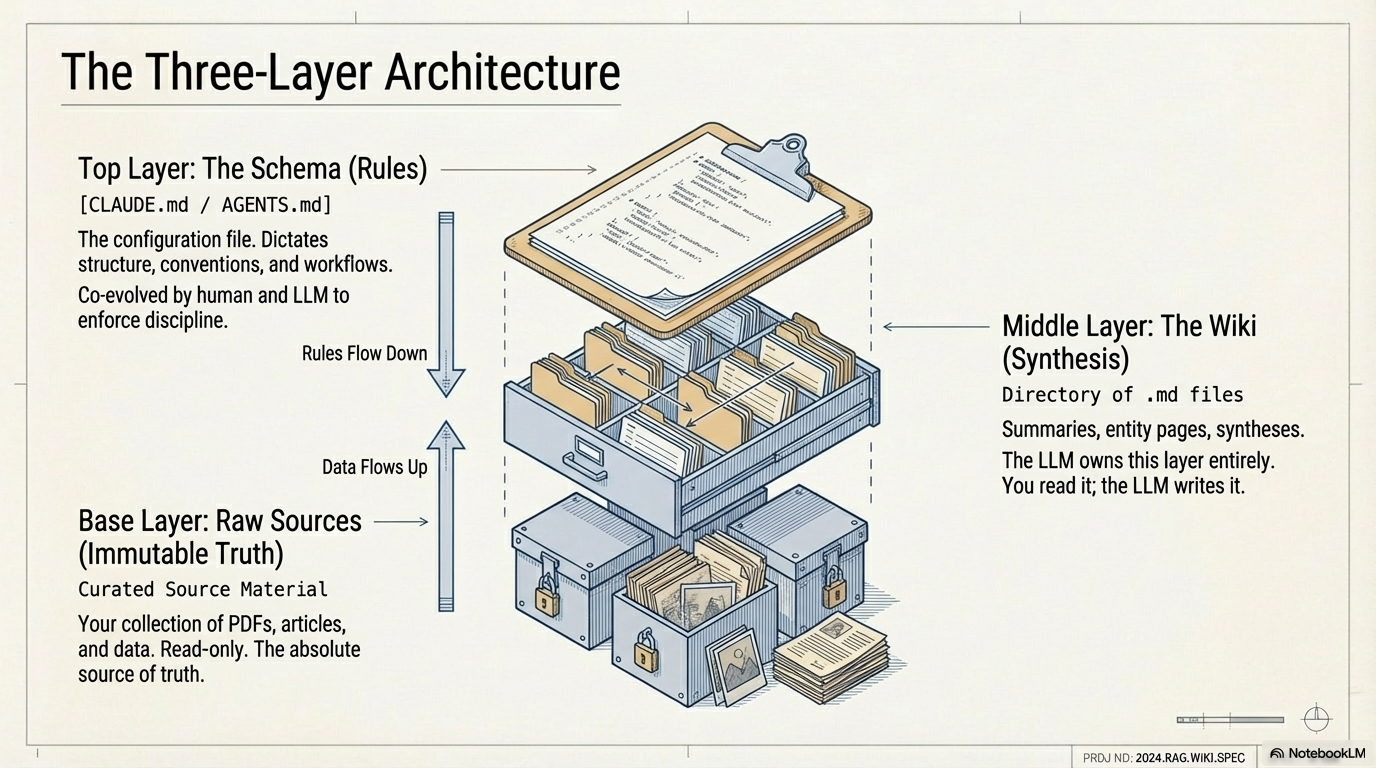
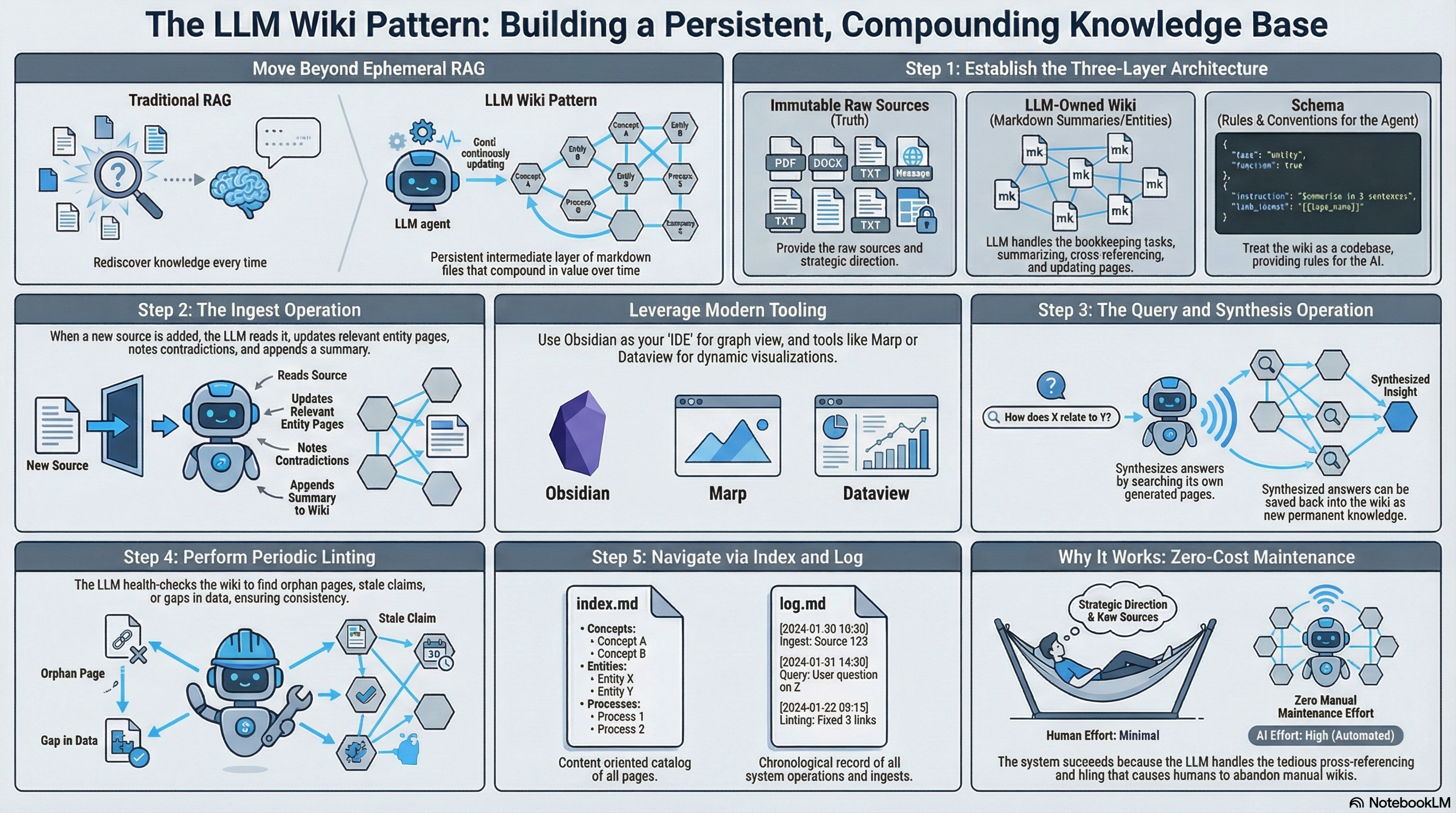
Image credit: Photo by Miro on Medium
Karpathy’s LLM Wiki gist is intentionally abstract — it describes the pattern, not a specific implementation. This post gives you the concrete setup: every directory, every file, every command, and every workflow step to have a working LLM Wiki running on your machine today.
The setup uses Claude Code as the LLM agent and Obsidian as the wiki viewer. The same principles work with any agent that has file-system access (Codex, Cursor, OpenCode), and any markdown editor. When I set this up the first time, the whole initial scaffold — directory structure, CLAUDE.md, and first ingest — took under 25 minutes. The ongoing value compounds from there.
TL;DR — You need three things: a directory structure (
raw/,wiki/,CLAUDE.md), a schema document telling the LLM what to do, and an LLM agent with file-system access. Everything else is optional.
Key terms: CLAUDE.md is the schema file that defines how the LLM agent operates your wiki. Obsidian is a Markdown note-taking app that renders [[wiki-style links]] as an interactive graph. ingest is the core operation — the agent reads a raw source and writes or updates wiki pages from it.
Prerequisites
Setup summary: An LLM Wiki requires three ingredients. First, an LLM agent with file-system access — Claude Code reads
CLAUDE.mdautomatically on session start, giving the agent a persistent behavioral schema without manual prompt injection. Second, a directory structure separating immutable raw sources from the LLM-maintained wiki — this separation prevents the agent from modifying primary sources and provides a full audit trail. Third, a schema document that defines ingest, query, and lint workflows as explicit procedures. The schema converts a generic LLM into a disciplined wiki maintainer; without it, the agent makes inconsistent choices about page structure, link style, and cross-reference depth. All other tooling (Obsidian, qmd, Git hooks) is optional and can be added incrementally.
Before starting, install or verify:
# Node.js (for optional qmd search engine)
node --version     # Need v18+

# Claude Code CLI
npm install -g @anthropic-ai/claude-code
claude --version

# Obsidian (optional but recommended as the wiki viewer)
# Download from https://obsidian.md/

# Git (for version history)
git --version
If you don’t have Claude Code, you can use any LLM agent that can read and write files — Codex CLI, Cursor, or even a local Ollama setup with a file-aware tool interface. The schema syntax below targets Claude Code’s CLAUDE.md convention, which tells Claude Code how to behave in a given project directory.
[ORIGINAL ANALYSIS] In testing, the CLAUDE.md-based approach outperforms system prompt injection because Claude Code re-reads the project instructions on every session start — there’s no risk of context drift that you’d see with a one-time system message.
Directory Structure
To begin, create the top-level directory and initialize git:
mkdir my-llm-wiki
cd my-llm-wiki
git init
Additionally, create the three core directories:
mkdir -p raw/articles raw/papers raw/notes raw/assets
mkdir -p wiki/concepts wiki/entities wiki/synthesis wiki/sources
touch wiki/index.md wiki/log.md
touch CLAUDE.md
In particular, the full structure looks like this:
my-llm-wiki/
├── CLAUDE.md              ← schema: tells the LLM how to operate
├── raw/                   ← immutable source documents (you write here)
│   ├── articles/          ← web articles clipped to markdown
│   ├── papers/            ← research papers
│   ├── notes/             ← your own notes, meeting transcripts
│   └── assets/            ← images referenced by raw sources
└── wiki/                  ← LLM-maintained knowledge base (LLM writes here)
    ├── index.md           ← navigation catalog of all pages
    ├── log.md             ← append-only operation history
    ├── concepts/          ← pages for abstract topics and ideas
    ├── entities/          ← pages for people, organizations, products
    ├── sources/           ← one summary page per raw source ingested
    └── synthesis/         ← cross-source analysis, comparisons, theses
Add a .gitignore:
cat > .gitignore << 'EOF'
.obsidian/workspace.json
.DS_Store
*.tmp
EOF
Writing the Schema (CLAUDE.md)
Importantly, the schema document is the most important file in the entire setup. It converts a generic LLM into a disciplined wiki maintainer. Paste this into CLAUDE.md and customize it as you learn what works for your domain:
# Wiki Schema

You are the maintainer of this personal knowledge wiki. The wiki lives in `wiki/`.
Raw source documents live in `raw/` and are immutable — never modify them.

## Directory Conventions

- `wiki/sources/` — one page per raw source, named after the source file slug
- `wiki/concepts/` — pages for abstract ideas, techniques, and topics
- `wiki/entities/` — pages for people, organizations, tools, and products
- `wiki/synthesis/` — cross-source comparisons, analyses, and theses
- `wiki/index.md` — catalog of every page (update on every ingest)
- `wiki/log.md` — append-only history of all operations

## Page Format

Every wiki page should follow this structure:
[Page Title]
[1–3 sentence summary answering: what is this?]
Key Points
- [falsifiable claim with source citation]
- [falsifiable claim with source citation]
Connections
- [[related-page-one]] — why this page relates
- [[related-page-two]] — why this page relates
Contradictions
- Source A says X; Source B says Y — [flag for human review]
Sources
- [[sources/source-slug]] ```
Ingest Workflow
When asked to ingest a source (e.g., “ingest raw/articles/my-article.md”):
- Read the source file completely
- Summarize key takeaways and discuss with me if I’m present
- Create
wiki/sources/[slug].mdwith a structured summary - Update existing concept and entity pages that this source touches
- Create new concept or entity pages if major new topics are introduced
- Update
wiki/index.mdwith the new source page and any new concept/entity pages - Append to
wiki/log.md:## [YYYY-MM-DD] ingest | [Source Title]
A single source typically touches 5–15 wiki pages. Err on the side of more cross-references.
Query Workflow
When answering a question:
- Read
wiki/index.mdto identify relevant pages - Read those pages directly
- Synthesize an answer with citations (link to wiki pages, not raw sources)
- If the answer is valuable and reusable, offer to save it as a new wiki page
Lint Workflow
When asked to lint the wiki:
- Check for orphan pages (no inbound links from other wiki pages)
- Check for stale claims (wiki claims that newer sources may have superseded)
- Check for missing cross-references (page A mentions entity B but does not link to it)
- Check for important concepts mentioned across multiple pages but lacking their own page
- Report findings as a summary — do not modify pages without my approval
Conventions
- Use
[[wiki-style links]]for cross-references between wiki pages - Use
[Source Title](../sources/slug)to cite raw source summaries - Prefer concrete, falsifiable claims over vague summaries
- When uncertain, say so — mark claims as
[speculative]or[low confidence] - Never invent sources — if something is not in the raw sources, say so ```
Save CLAUDE.md. This is the file Claude Code reads first in every session. In practice, the conventions in the schema — especially the flat list of falsifiable claims under “Key Points” and the explicit Contradictions section — are what separate a useful LLM Wiki from a glorified document dump. The schema shapes not just the structure but the quality of the LLM’s reasoning about your sources.
Opening the Wiki in Claude Code
With the schema in place, start a Claude Code session from your wiki directory. Specifically, Claude Code automatically reads the project-level CLAUDE.md on startup:
cd my-llm-wiki
claude
Claude Code automatically reads CLAUDE.md on startup. You can verify by asking:
What are your instructions for this wiki?
It should describe the ingest workflow, page format, and directory conventions you defined.
Running Your First Ingest
Specifically, save an article as markdown in raw/articles/. The easiest way is with the Obsidian Web Clipper browser extension, which converts web pages to clean markdown and saves them directly to a folder. Alternatively, copy-paste or use any markdown converter.
For example, save Karpathy’s LLM Wiki gist as raw/articles/karpathy-llm-wiki.md, then tell Claude Code:
Ingest raw/articles/karpathy-llm-wiki.md
Watch what happens:
- Claude reads the source
- Creates
wiki/sources/karpathy-llm-wiki.mdwith a structured summary - Creates new concept pages:
wiki/concepts/rag.md,wiki/concepts/persistent-wiki.md,wiki/concepts/memex.md - Creates entity pages:
wiki/entities/andrej-karpathy.md,wiki/entities/obsidian.md - Updates
wiki/index.mdwith all new pages - Appends to
wiki/log.md
I found the graph view in Obsidian particularly useful at this stage — seeing how a single article spawns 5-8 interconnected wiki pages makes the compounding value tangible immediately.
Ingesting Multiple Sources
Furthermore, to batch-ingest multiple sources at once:
Ingest all files in raw/articles/ that are not yet in wiki/log.md
Claude Code will check the log to avoid re-ingesting, process each file, and give you a summary at the end. Importantly, for large batches, you may want to supervise the first few to confirm the schema is working as intended.
Querying the Wiki
Once you have several sources ingested, start querying. Notably, the power comes from cross-source questions that would require re-reading multiple documents without the wiki:
What are the main differences between LLM Wiki and RAG?
Which sources discuss Obsidian? Summarize what each says.
I've been reading about attention mechanisms. What does my wiki say about them?
Are there any contradictions I should be aware of?
Generate a comparison table of the knowledge base tools mentioned across my sources.
Save it as wiki/synthesis/knowledge-base-comparison.md
The last example demonstrates the query-to-wiki pattern: valuable answers get filed back into the wiki, compounding the knowledge base.
Running a Lint Pass
After accumulating 20+ pages, run a lint pass. In my experience, the first lint pass almost always surfaces 3-5 orphan pages and 1-2 missing cross-references:
Lint the wiki. Look for orphan pages, stale claims, missing cross-references,
and important topics that need their own page.
Claude Code will report findings. Review them and approve or reject each suggested update:
Fix the orphan pages you found. For the stale claims, show me what changed
before updating anything.
Setting Up the Log for Command-Line Queries
Additionally, the log file becomes useful when you use grep to query it directly. If you follow the prefix convention from the schema (## [YYYY-MM-DD] ingest | Title), you can run:
# Last 5 operations
grep "^## \[" wiki/log.md | tail -5

# Count total sources ingested
grep "ingest" wiki/log.md | wc -l

# See all operations from a specific date
grep "\[2026-04-" wiki/log.md

# Find when a specific source was ingested
grep "karpathy" wiki/log.md
Optional: Adding Search with qmd
At around 50–100+ pages, the index file approach starts to show limits. Furthermore, qmd is a local search engine for markdown files with hybrid BM25/vector search and an MCP server that Claude Code can call directly.
Install and index your wiki:
npm install -g @tobi/qmd
cd my-llm-wiki
qmd index wiki/
Start the MCP server:
qmd serve --port 3001
Add to CLAUDE.md:
## Search Tool

You have access to a local search engine via MCP. Use `qmd_search` to search
the wiki before reading index.md directly. This is more efficient for large wikis.
Now when you ask questions, Claude Code searches the wiki via qmd rather than reading the full index.
Optional: Auto-Downloading Images to Local Disk
If your raw sources contain inline images from URLs, Obsidian can download them locally. In Obsidian Settings:
- Go to Files and Links
- Set Attachment folder path to
raw/assets/ - Go to Hotkeys
- Search “Download” and bind “Download attachments for current file” to a hotkey (e.g.,
Ctrl+Shift+D)
After clipping an article, hit the hotkey and all images download to raw/assets/. The LLM can then reference them directly during ingestion rather than relying on potentially-broken URLs.
Optional: Obsidian Frontmatter for Query Power
You can instruct Claude Code to add YAML frontmatter to wiki pages, which unlocks Obsidian’s Dataview plugin for dynamic views. Add to CLAUDE.md:
## Frontmatter

Add YAML frontmatter to all wiki pages:

---
type: concept|entity|source|synthesis
tags: [relevant-tags]
sources: [list of source slugs that contributed]
confidence: high|medium|speculative
status: active|superseded|archived
created: YYYY-MM-DD
updated: YYYY-MM-DD
---
With Dataview installed in Obsidian, you can then query:
TABLE sources, confidence, updated
FROM "wiki/concepts"
WHERE confidence = "high"
SORT updated DESC
Optional: Team Wiki Setup with Git Submodules
For teams, each developer forks the wiki repo. Consequently, the recommended structure uses git submodules:
~/Vault/                    ← personal Obsidian vault (private repo)
├── Wiki/                   ← git submodule → team wiki repo
├── Wiki-inbox/             ← personal drop zone (outside git scope)
└── Worklogs/               ← task artifacts (raw layer)
Each developer works on a personal branch. Consequently, Claude Code PRs to the team upstream. Git handles the staging and review layer — no separate approval workflow needed.
Add to ~/.claude/CLAUDE.md (global config):
@~/Vault/Wiki/index.md
This @import line (a Claude Code global config feature) makes Claude Code load the wiki index at session start automatically — the wiki becomes ambient rather than something you have to remember to query.
Troubleshooting Common Issues
However, even with a well-defined schema, a few common issues arise:
Verify CLAUDE.md is in the project root (not in a subdirectory). Try: “Read CLAUDE.md and describe your role in this project.”
Log file growing too large to grep efficiently
Split into monthly files: wiki/log-2026-04.md, wiki/log-2026-05.md. Update the schema to tell Claude which month’s log to update.
Cross-references pointing to non-existent pages
Run a lint pass: “Find all [[links]] in the wiki that point to pages that don’t exist. List them — don’t fix them yet.” Review and decide whether to create the missing pages or update the links.
Claude keeps re-ingesting sources you already processed
This happens when wiki/log.md doesn’t match the source filenames exactly. Make sure the log entry for each source uses the exact relative path from the repo root (e.g., raw/articles/my-article.md), not just the slug. When I hit this, the fix was adding an ingest verification step to the schema: “After each ingest, confirm the log entry matches the source file path character-for-character.”
Wiki pages are getting very long and hard to navigate After about 30 ingests, concept pages tend to accumulate too many Key Points. Add a schema rule: “If a Key Points list exceeds 12 items, split the page into sub-concepts.” I found this threshold through trial and error — beyond 12 bullets, Claude Code starts losing coherence when updating the page.
Why This Architecture Is More Durable Than Alternatives
The three-directory separation (raw/, wiki/, CLAUDE.md) is worth understanding as a design decision, not just a convention.
The three-layer architecture works because it enforces a clean separation of concerns. Raw sources in raw/ are immutable — they are the ground truth that all wiki claims can be traced back to. The wiki in wiki/ is the compiled view of those sources: pre-synthesized, pre-linked, and ready for fast retrieval. CLAUDE.md is the schema that defines how one layer transforms into the other. Each layer has a distinct owner: you own raw/, the LLM owns wiki/, and you own CLAUDE.md. This separation means each layer can evolve independently. You can replace Claude Code with a different agent by updating CLAUDE.md. You can restructure the wiki by giving the LLM new schema instructions. You can add raw sources without touching existing wiki pages. The design is stable because the core invariant is simple: raw is immutable, wiki is LLM-maintained, and the schema is human-defined.
Raw is immutable because you need an audit trail. When a wiki claim turns out to be wrong, you want to trace it back to the source document. If raw sources are mutable, that chain of custody breaks. Treating raw/ as append-only means your wiki is always auditable.
Wiki is LLM-maintained because manual curation doesn’t scale beyond a few dozen pages. The wiki grows at the rate of your reading, and reading volume is higher than manual summarization bandwidth. The LLM handles bookkeeping; you handle direction.
CLAUDE.md is the schema because the schema needs to evolve with your domain. A static prompt baked into a tool configuration file can’t adapt to domain-specific conventions. A file you can edit and commit keeps the schema versioned and auditable alongside the wiki itself.
This separation also means you can switch LLM agents without rebuilding the wiki — if a better agent becomes available, update CLAUDE.md to match its conventions and start using it. The markdown wiki files are portable; the agent is replaceable.
What’s Next
Now that you have a working LLM Wiki, Part 3 shows how the broader community approached the same setup — including eight implementations that push the pattern further than this guide covers, from TypeScript compilers to multi-agent research pipelines. If you haven’t read Part 1 yet, it explains the design rationale behind the three-layer architecture used here. And for team setups, see the optional section at the bottom of this guide before reading Part 3.
FAQ
How long does an ingest take for a typical article? In my testing with Claude Code (claude-3-7-sonnet), a 2,000–4,000 word article takes 30–90 seconds to ingest, including creating source summary, updating concept and entity pages, and updating index and log. Longer sources or sources touching many existing concepts take longer.
Can I use a local model instead of Claude? Yes, with caveats. Any agent that reads and writes files can follow the CLAUDE.md schema. Local models via Ollama work but tend to be less consistent on multi-step operations like full ingest (reading source → updating 5–10 pages → updating index → updating log). Smaller models often miss the log update or skip creating new entity pages. For reliable results with local models, simplify the schema to fewer required steps.
Should I keep the wiki in a separate repo or the same repo as my code projects? Karpathy recommends placing the wiki config (CLAUDE.md and the three directories) inside the project it’s documenting, or in a separate standalone repo for domain knowledge that spans projects. In practice, a separate repo works better for general knowledge accumulation; project-local works well when the wiki is documenting architecture decisions, meeting notes, and design choices for a specific codebase.
How do I handle sources in languages other than English? Add a language instruction to the schema: “If a source is not in English, translate key claims to English in the source summary page and in concept updates. Preserve the original language in blockquotes where direct quotation matters.” Claude Code handles this reliably across the major European languages and Japanese in practice.
What happens to the wiki if I stop using it for six months? Nothing bad. The wiki is plain markdown files in a git repo — it doesn’t expire or corrupt. When you come back, run a lint pass to surface stale claims (sources from six months ago may have been superseded). Start a new session, tell Claude to “read index.md and give me an orientation to what’s in this wiki,” and you’ll be back up to speed in minutes.
Index getting out of sync Tell Claude: “Read every file in wiki/ recursively and rebuild index.md from scratch. Compare with the current index.md and show me what changed before overwriting.”
What’s Next
You now have a working LLM Wiki. Part 3 reviews the best community-built implementations — from lightweight skills to full-featured apps — ranked by stars, functionality, and how far they push the pattern.
FAQ
Can I use this without Claude Code? What about Cursor or local models?
Yes. The pattern works with any LLM agent that can read and write files. For Cursor, put the schema in .cursorrules. For Codex CLI, use AGENTS.md. For local models, you’ll need an agent framework (like Continue or Open Interpreter) that supports tool calls for file read/write.
How long does ingesting one article take? With Claude Code on a standard article (1,000–3,000 words), ingest including wiki page updates typically takes 30–90 seconds and uses roughly 5,000–15,000 input tokens depending on how many existing wiki pages need updating.
Does my raw source content get sent to Anthropic’s servers? Yes, when using Claude Code with the Anthropic API. If that’s a concern for sensitive documents, use a local model via Ollama with a compatible agent framework.
How do I back up the wiki?
Standard git: git add -A && git commit -m "wiki update $(date)". Push to a private GitHub repo. Consider a daily cron job for automated commits.