8 min to read
What Is DESIGN.md, and Why Is It Becoming the Standard for AI-Built Websites?
A practical guide with examples, patterns, and links you can explore today
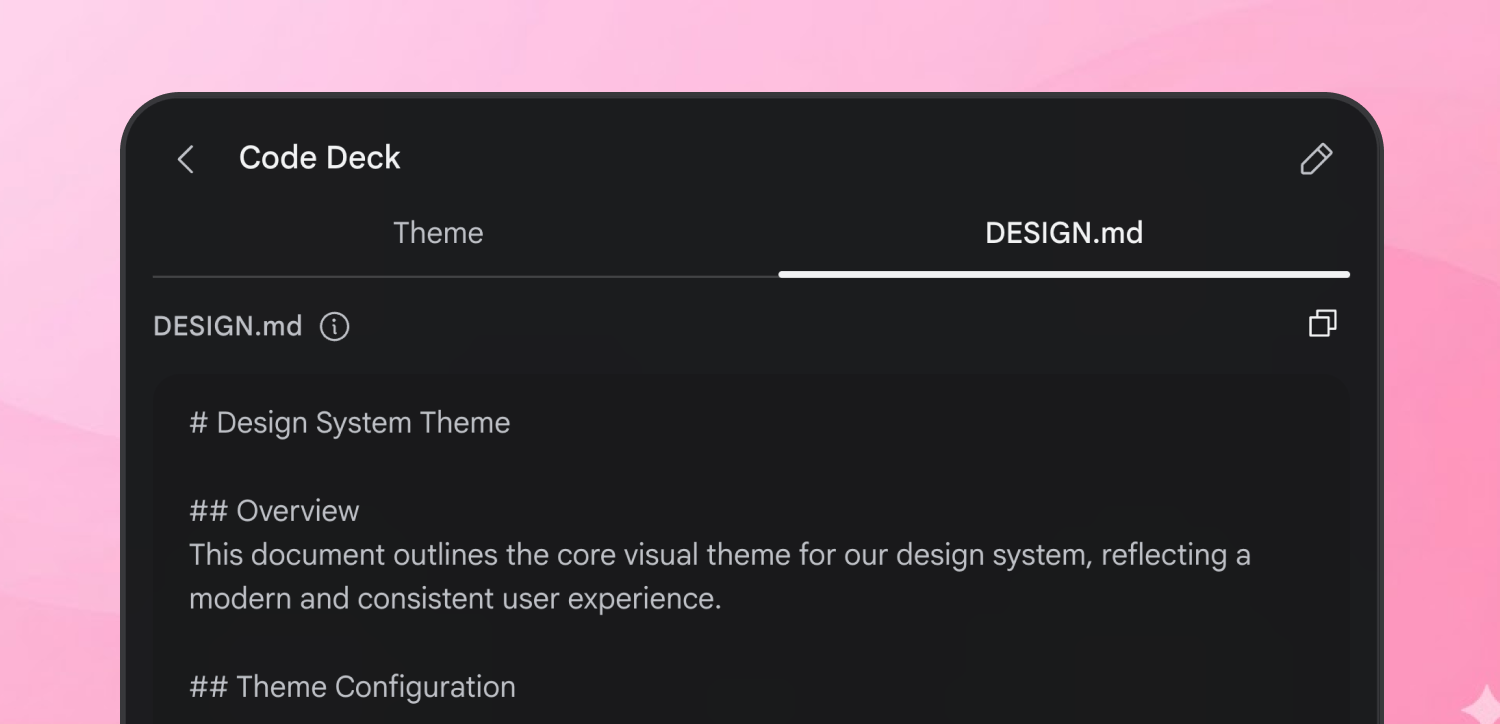
Image credit: Google Stitch
If you have built UI with AI coding agents, you already know the problem: the output is often clean, but generic. You ask for a landing page and get the same rounded cards, the same gradient hero, and the same “looks good but not our brand” feeling.
DESIGN.md is the response to that problem. It gives your AI agent a design system in plain markdown so it can generate UI that matches your brand language consistently.
TL;DR: DESIGN.md is a markdown file that describes your design system semantically: visual atmosphere, color roles, typography, component rules, layout behavior, and guardrails. Teams are adopting it because AI agents read markdown well, and DESIGN.md keeps intent plus implementation guidance in one versioned file.
What Is DESIGN.md?
DESIGN.md is a human-readable, AI-friendly design system document. It is usually placed in the root of a repository and used as a reference before an AI agent generates UI code.
At a high level, it answers:
- What should this product feel like?
- Which colors and type rules should be used, and where?
- How should core components look and behave?
- What should the agent avoid?
- How should the UI adapt across breakpoints?
Google Stitch documentation describes DESIGN.md as a design system document that AI agents read to generate consistent UI across a project. The broader ecosystem then expanded that idea with reusable, brand-inspired DESIGN.md libraries.
Why DESIGN.md Is Becoming an Industry Standard
“Standard” here does not mean a formal committee spec. It means a shared, repeatable convention that multiple tools and teams are converging on.
1. It solves the prompt repetition tax
Without DESIGN.md, teams repeat visual instructions in every prompt. That is expensive and inconsistent.
With DESIGN.md, the agent reads one file and applies the same rules every time. This reduces prompt length and lowers drift between screens.
2. It captures intent, not just tokens
Token JSON tells you values, but often not rationale. A good DESIGN.md includes both rules and why those rules exist.
That matters when the agent faces a case not explicitly listed. If the file says “use borders for separation, avoid heavy shadows,” the model can generalize correctly.
3. It fits existing engineering workflows
Markdown is easy to diff, review, version, and discuss in pull requests. Teams can evolve design language the same way they evolve code.
This is one reason DESIGN.md spreads quickly in AI-first product teams: it matches how developers already collaborate.
4. It is model-agnostic in practice
Agents differ, but markdown is universally readable. A single DESIGN.md can guide different coding agents with minimal changes to workflow.
5. It makes output quality more predictable
Consistency is the real win. Even if two developers write different prompts, the generated UI tends to stay inside the same design envelope when both rely on the same DESIGN.md.
What Goes Inside a Strong DESIGN.md
A widely adopted structure includes these nine sections:
- Visual theme and atmosphere
- Color palette and semantic roles
- Typography rules
- Component styles
- Layout principles
- Depth and elevation
- Do and do not rules
- Responsive behavior
- Agent prompt guide
This structure maps closely to how agents make UI decisions: from high-level feel to low-level component behavior.
Quick Example: Minimal SaaS DESIGN.md Snippet
# Design System: Minimal SaaS Dashboard

## 1. Visual Theme & Atmosphere
Calm, precise, low-noise interface. Density over decoration.

## 2. Color Palette & Roles
- Surface Base (#0F1115): primary background
- Surface Card (#151922): cards and panels
- Accent Action (#3B82F6): primary actions only
- Text Primary (#E7EAF0): body and headings
- Border Quiet (#2A3140): separators and field outlines

## 3. Typography
- UI font: Inter
- Heading tracking: -0.02em for H1/H2
- Body: 15px / 1.6 line-height

## 4. Components
Button/Primary:
- Radius: 8px
- Padding: 10px 14px
- Hover: 8% brightness increase
- No gradient backgrounds

Card:
- 1px border using Border Quiet
- No drop shadow at rest

## 7. Do and Do Not
Do:
- Keep spacing on 8px scale
- Use accent only for actionable elements

Do Not:
- Do not use full-pill buttons
- Do not mix warm and cool grays
This is the core idea: descriptive but operational.
Why This Works Better Than “Make it look like X”
“Make it look like X” is weak context. It often captures surface style but misses system behavior.
DESIGN.md is stronger because it adds:
- Semantic roles for colors
- Explicit component states
- Layout constraints
- Negative guardrails (things to avoid)
That combination gives agents both creative direction and safety rails.
Real Workflow: How Teams Use DESIGN.md
A practical team flow looks like this:
- Create or adopt a starter DESIGN.md.
- Put it in repo root.
- Tell agents: “Use DESIGN.md as source of truth for UI generation.”
- Generate pages/components.
- Review visual drift.
- Update DESIGN.md, not just one-off prompts.
This makes styling changes systematic. If you change spacing philosophy or border style, update one file and regenerate with consistent behavior.
Explore Real DESIGN.md Files and References
If you want to learn quickly, study live examples instead of writing from zero.
- Stitch overview
- What DESIGN.md means in practice
- Curated DESIGN.md repository
- Stitch design-md skill (format + synthesis flow)
- Skill source file with concrete structure
You can also browse brand-inspired files directly from getdesign:
- Vercel-inspired DESIGN.md
- Linear-inspired DESIGN.md
- Stripe-inspired DESIGN.md
- Notion-inspired DESIGN.md
- Figma-inspired DESIGN.md
Use these as learning references, not as blind copy templates.
Common Mistakes When Adopting DESIGN.md
Mistake 1: Writing only tokens
If your file is just color and spacing values, the agent will miss intent.
Fix: add semantic roles and reasoning.
Mistake 2: No anti-pattern section
Without “do not” constraints, agents tend to reintroduce generic UI tropes.
Fix: include explicit forbidden patterns.
Mistake 3: Not updating the file over time
Teams often treat DESIGN.md as static. That causes drift.
Fix: treat DESIGN.md like code: PRs, review, versioning.
Mistake 4: Over-fitting to one page
A one-page style snapshot does not scale across product surfaces.
Fix: define principles that survive multiple contexts.
How to Start in 30 Minutes
Use this bootstrap checklist:
- Write atmosphere in 4-6 sentences.
- Define 6-10 semantic color roles with hex values.
- Document typography hierarchy.
- Define primary button, secondary button, card, input, nav.
- Add spacing scale and breakpoints.
- Add at least five “do not” rules.
- Add a mini prompt guide with 3 reusable prompts.
Then generate one page and run a consistency review. Update the file based on failures.
Where DESIGN.md Fits in a Mature Design Stack
DESIGN.md is not a replacement for Figma, component libraries, or token pipelines. It is the interface layer between design intent and AI generation.
Think of it as:
- Figma: source for visual exploration and high-fidelity design
- Token system: source for implementation-safe values
- DESIGN.md: source for AI generation behavior
When these three align, AI-generated UI quality improves significantly.
FAQ
Is DESIGN.md an official web standard?
No. It is an emerging community convention adopted by AI-first teams and tools. Its value comes from interoperability and practical results.
Do I still need a design system if I have DESIGN.md?
Yes. DESIGN.md works best as the AI-facing expression of your design system, not a replacement for full design governance.
Should startups use a prebuilt DESIGN.md?
Usually yes as a starting point. Pick a style close to your desired direction, then customize semantics, spacing, and component rules to make it truly yours.
Can one DESIGN.md support both marketing site and product app?
Yes, but include context-specific sections. For example, define separate guidance for conversion pages versus dense app dashboards.
How do I know if my DESIGN.md is good?
Run two tests: first, generate three different pages with different prompts and check consistency. Second, hand the file to another developer and see if they can produce matching UI without extra verbal guidance.
Final Takeaway
DESIGN.md is gaining traction because it turns “design taste” into reusable engineering context for AI agents. That is exactly what modern teams need: less prompt micromanagement, more predictable output, and a clearer bridge between design and code.
If you are using AI to build websites, adopting DESIGN.md early gives you a compounding advantage. Your UI quality gets better with each iteration instead of resetting every prompt.
For related reading on this site: